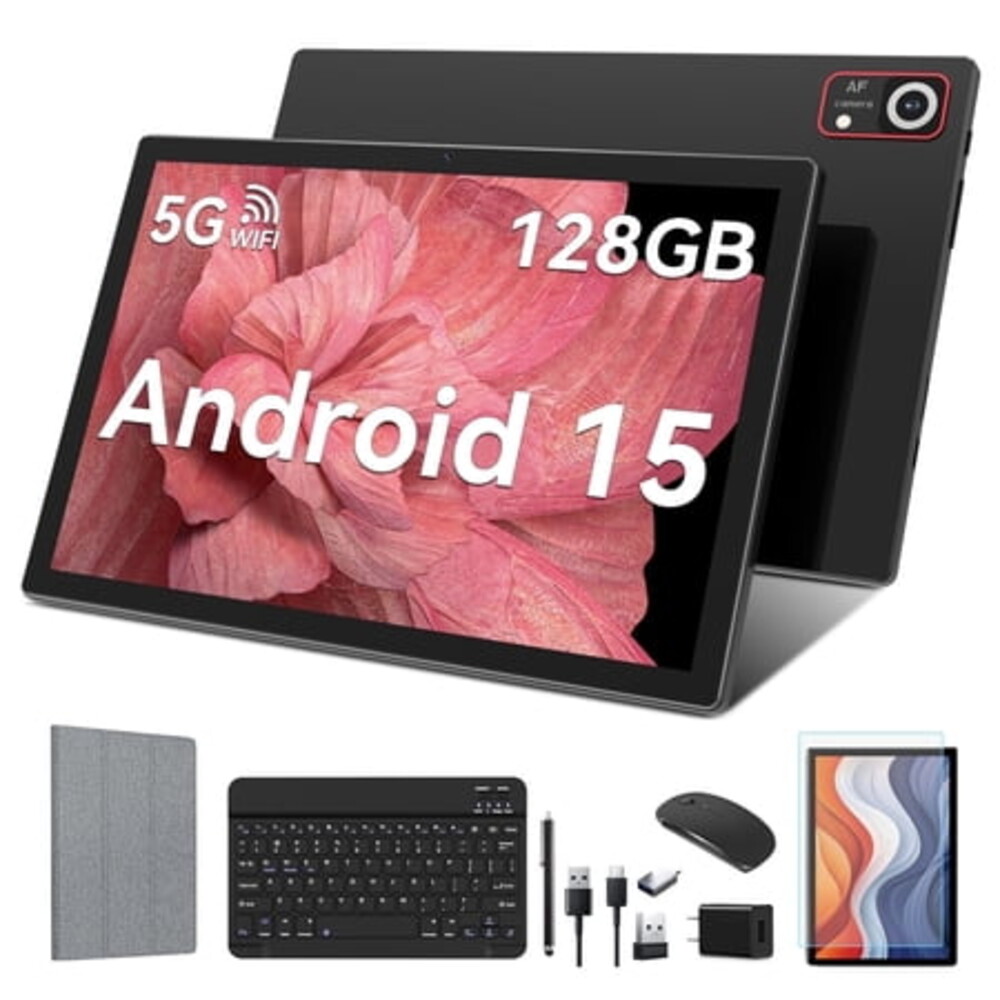
Android 15 Tablet ,8GB Ram 128GB Rom,5G WIFI 8MP+13MP Camera,1280x800 IPS Google Tablets
As a Walmart Affiliate, we may earn a commission on qualifying purchases.
Brand:TABURETO System:Android 15 WIFI:5G+2.4G WIFI CPU:2.0 GHZ | Octa-Core RAM:8GB ROM:128 GB(Expand to 1TB) Battery:8000mAh Screen Size:10.1 inch Front Camera:5 MP Rear camera:13MP Charging interface type:Type-C Headphone jack type:3.5mm Linking the Mouse Method: 1. Remove the mouse's battery compartment cover, take out the mouse's signal receiver, and then place two AAA batteries inside the mouse.
2. Attach the adapter to the Type-C port of the tablet. 3.
Plug the mouse's signal receiver into the female end of the adapter. 4. Activate the mouse's power switch, and you're done.
Pairing the Bluetooth Keyboard Method: 1. Turn on the tablet's Bluetooth and press and hold to navigate to a new page. 2.
Choose "+ pair new device" from the options. 3. Power on the Bluetooth keyboard by switching it to "ON" and then tap "Connect".
4. When the "Bluetooth 3.0 Keyboard" appears on the tablet's screen, select it to initiate pairing. 5.
If a six-digit code appears on the tablet, enter the same code on the keyboard to establish a connection. (If no code is displayed, just select "Connect".) Please be aware that the Bluetooth keyboard should be charged before its first use. If the Bluetooth keyboard is not needed, simply switch it off.
Once the keyboard is fully charged, it can then be paired with the tablet.








No comments yet. Be the first to share your thoughts!